> For the complete documentation index, see [llms.txt](https://faultx.gitbook.io/rn10p-docs/llms.txt). Markdown versions of documentation pages are available by appending `.md` to page URLs; this page is available as [Markdown](https://faultx.gitbook.io/rn10p-docs/troubleshooting/tee-broken.md).
# TEE Broken
## Apa Itu TEE Broken?
TEE (Trusted Execution Environment) adalah bagian khusus di prosesor yang menyimpan data keamanan seperti fingerprint, Widevine, dan Play Integrity. TEE Broken berarti ruang keamanan ini rusak atau tidak berfungsi.
## Dampak TEE Broken
Widevine turun ke L3 (tidak bisa streaming HD) Fingerprint gagal atau tidak bisa digunakan Play Integrity / Safety API gagal Aplikasi keamanan bermasalah.
## Penyebab Umum
* Flash ROM yang tidak sesuai
* Downgrade firmware
* Partisi rusak
* Salah mem-flash keybox atau file keamanan
* Flash file `persist.img`
* Dan lain-lain
## Bisa Diperbaiki?
Kadang bisa (melalui flash firmware atau pemulihan key),\
tapi jika rusak pada hardware TEE → tidak bisa diperbaiki kecuali ganti mainboard.
{% hint style="info" %}
Untuk cek TEE bisa menggunakan aplikasi Momo: [Download](https://faultxcloud.github.io/fx.rn10p.docs/assets/apk/Momo_4.4.1.apk)\
Android Key Attestation Test App: [Download](https://github.com/vvb2060/KeyAttestation/releases/download/v1.8.4/KeyAttestation-v1.8.4.apk)
{% endhint %}
***
## :rectangle-terminal: Fix TEE Broken
{% hint style="danger" %}
**Risiko Penggunaan Keybox Leak & Lock Bootloader (LBL)**
Jika kamu menggunakan file keybox.xml dari sumber yang tidak resmi (bocor/leak) untuk memperbaiki TEE dan mengunci kembali *bootloader* (Relock), harap perhatikan risiko berikut:
1. Pencabutan Akses (Revoked): Google menggunakan metode pengecekan Server-Side. Artinya, server Google secara rutin mencocokkan identitas file tersebut dengan database mereka. Jika file terdeteksi sebagai bocoran, Google akan langsung mencabut izinnya secara otomatis dari pusat.
2. Perangkat Tidak Tersertifikasi: Begitu akses dicabut oleh server, perangkat kamu akan langsung berstatus "Device is not certified" di Google Play Store.
3. Terjebak di Kondisi LBL: Karena kondisi *bootloader* sudah terkunci (Locked), kamu tidak bisa lagi melakukan modifikasi sistem dengan mudah untuk memperbaikinya. Akibatnya, aplikasi perbankan, dompet digital, dan aplikasi penting lainnya (kemungkinan) tidak akan bisa digunakan secara normal kecuali *bootloader* dibuka kembali.
Intinya: Keamanan ini dikontrol langsung oleh server Google. Meskipun hari ini terlihat aman, status sertifikasi bisa hilang kapan saja tanpa pemberitahuan jika Google memperbarui daftar blokir mereka.
Testing: **19 Juni 2024**
{% endhint %}
{% hint style="warning" %}
Rename `keybox.xml` to `sw.xml`
{% endhint %}
* Flash [Engineering ROM](/rn10p-docs/engineering-rom.md) using [MiFlash Tools](/rn10p-docs/tools/xiaomi-tools.md#miflash-tools) (flash all)
* Enable Developer Options
* Make sure the sw\.xml file is located in the same folder.
* Open CMD/Terminal and execute the command below:
```
adb root
```
```
adb remount
```
```
adb reboot
```
```
adb shell mkdir -p /data/nativetest64/qti_keymaster_tests/
```
```
adb push sw.xml /data/nativetest64/qti_keymaster_tests/
```
```
adb shell LD_LIBRARY_PATH=/vendor/lib64/hw KmInstallKeybox /data/nativetest64/qti_keymaster_tests/sw.xml sw true
```
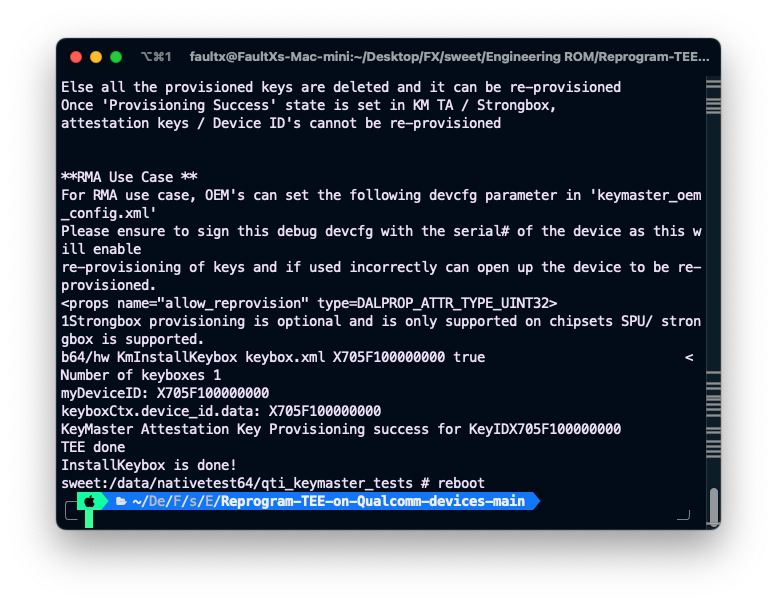
* If the message says: `TEE done Installkeybox is done!` , it means it’s correct
* Flash the Stock ROM MIUI using MiFlash
* Done!
*Thanks* [*chiteroman*](https://github.com/chiteroman)
***
:camera-viewfinder: Dokumentasi saat saya Fix TEE Broken
***
\
---
# Agent Instructions
This documentation is published with GitBook. GitBook is the documentation platform designed so that both humans and AI agents can read, navigate, and reason over technical content effectively. Learn more at gitbook.com.
## Querying This Documentation
If you need additional information that is not directly available in this page, you can query the documentation dynamically by asking a question.
Perform an HTTP GET request on the current page URL with the `ask` query parameter:
```
GET https://faultx.gitbook.io/rn10p-docs/troubleshooting/tee-broken.md?ask=
```
The question should be specific, self-contained, and written in natural language.
The response will contain a direct answer to the question and relevant excerpts and sources from the documentation.
Use this mechanism when the answer is not explicitly present in the current page, you need clarification or additional context, or you want to retrieve related documentation sections.