> For the complete documentation index, see [llms.txt](https://faultx.gitbook.io/rn10p-docs/llms.txt). Markdown versions of documentation pages are available by appending `.md` to page URLs; this page is available as [Markdown](https://faultx.gitbook.io/rn10p-docs/tools/debloat.md).
# Debloat
## Apa Itu Debloat?
**Debloat** adalah proses menghapus atau menonaktifkan aplikasi bawaan (bloatware) yang dianggap tidak perlu oleh pengguna.\
**Bloatware** biasanya berasal dari pabrikan, operator, atau aplikasi sistem yang jarang dipakai namun memakan ruang penyimpanan, RAM, dan sumber daya.
Debloat bertujuan membuat perangkat lebih ringan, lebih cepat, dan lebih hemat baterai.
## Keuntungan Debloat
* Mengurangi penggunaan RAM
* Memperbaiki performa perangkat
* Menghemat baterai
* Mengurangi notifikasi dan proses latar belakang
## Risiko Debloat
Menghapus aplikasi penting dapat menyebabkan error Fitur tertentu mungkin berhenti berfungsi Jika dilakukan tanpa pengetahuan, bisa menyebabkan sistem tidak stabil
## Kesimpulan
Debloat adalah cara untuk menghilangkan aplikasi bawaan yang tidak diperlukan, sehingga sistem menjadi lebih ringan. Namun, harus berhati-hati karena beberapa aplikasi sistem penting tidak boleh dihapus.
***
{% hint style="danger" %}
I am not responsible for anything happened to your device do at your own risk!
***
Saya tidak bertanggung jawab atas apapun yang terjadi pada perangkat kamu, lakukan dengan risiko kamu sendiri!
{% endhint %}
## Menggunakan Tools
{% hint style="success" %}
Pastikan *Developer Options* sudah aktif.
{% endhint %}
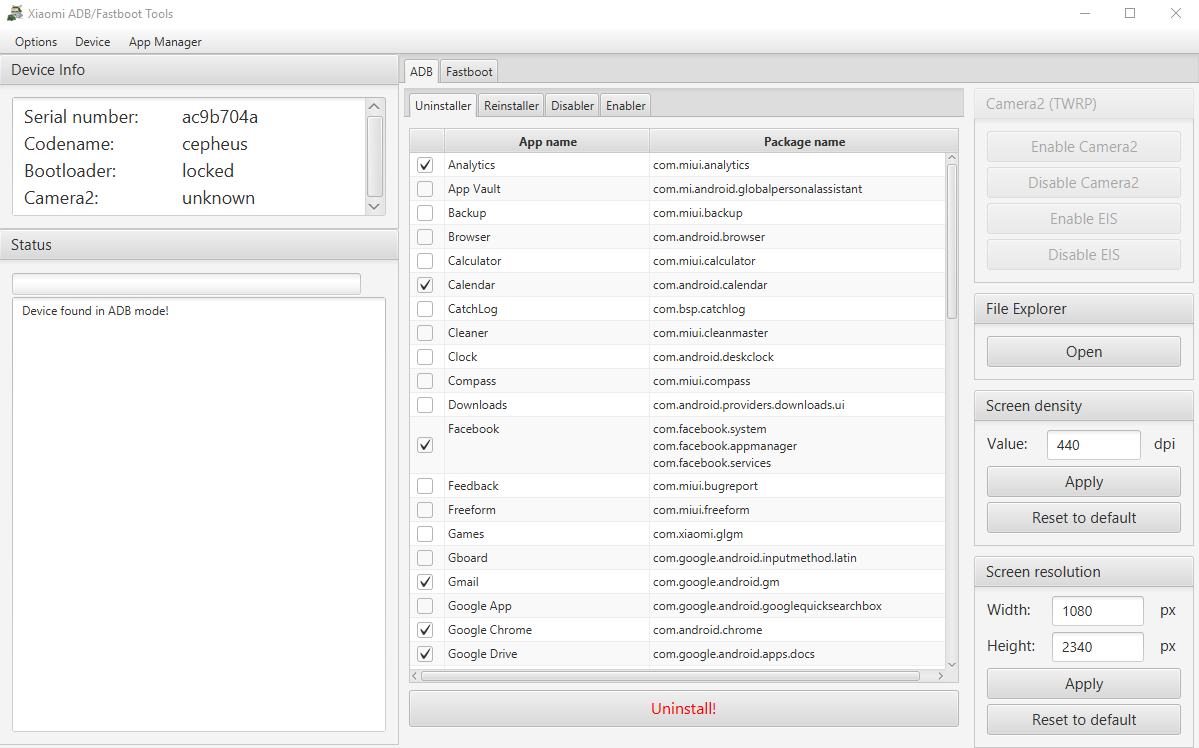
### XiaomiADBFastbootTools
**Requirement:**
* Install JDK for run `.jar` (Windows, Mac, Linux): [**Download**](https://www.oracle.com/asean/java/technologies/downloads/)
* Adb Driver:
:apple: macOS
* Install [Homebrew](https://brew.sh/)
* Install *Android platform tools*
```
brew install android-platform-tools
```
:linux: Linux
Install *Android platform tools* on your PC :
Debian Base:
```
sudo apt install android-sdk-platform-tools
```
Arch-Linux Base:
```
sudo pacman -S android-tools
```
Red Hat Base:
```
sudo yum install android-tools
```
OpenSUSE Base:
```
sudo zypper install android-tools
```
:microsoft: Windows
[ADB & Fastboot](/rn10p-docs/tools/adb-and-fastboot.md)
DownloadMirror
***
### Universal Android Debloater GUI
Install ADB:
:apple: macOS
* Install [Homebrew](https://brew.sh/)
* Install *Android platform tools*
```
brew install android-platform-tools
```
:linux: Linux
Install *Android platform tools* on your PC :
Debian Base:
```
sudo apt install android-sdk-platform-tools
```
Arch-Linux Base:
```
sudo pacman -S android-tools
```
Red Hat Base:
```
sudo yum install android-tools
```
OpenSUSE Base:
```
sudo zypper install android-tools
```
:microsoft: Windows
[ADB & Fastboot](/rn10p-docs/tools/adb-and-fastboot.md)
Download
***
### Canta
Uninstall any Android app without root (with power of Shizuku). Debloat your device as you wish, no PC required.
Download
***
## :file-code: Menggunakan Script
{% embed url="" %}
{% hint style="warning" %}
Pastikan komputer kamu sudah terinstall [adb-fastboot (driver)](/rn10p-docs/tools/adb-and-fastboot.md) dengan benar.
{% endhint %}
### :microsoft: Windows
Script batch untuk Operating System Windows
{% hint style="info" %}
Windows user = run `.bat`
{% endhint %}
:memo-circle-info: **MIUI 12**
{% file src="/files/4HmzLR9BB4Jfq05C7co0" %}
:memo-circle-info: **MIUI 13 - 14**
{% file src="/files/SO6qdzZ4oEDHaXOPUogr" %}
### :apple: macOS / :linux: Linux
Script shell untuk Operating System macOS atau Linux.
Install ADB:
:apple: macOS
* Install [Homebrew](https://brew.sh/)
* Install *Android platform tools*
```
brew install android-platform-tools
```
:linux: Linux
Install *Android platform tools* on your PC :
Debian Base:
```
sudo apt install android-sdk-platform-tools
```
Arch-Linux Base:
```
sudo pacman -S android-tools
```
Red Hat Base:
```
sudo yum install android-tools
```
OpenSUSE Base:
```
sudo zypper install android-tools
```
:microsoft: Windows
[ADB & Fastboot](/rn10p-docs/tools/adb-and-fastboot.md)
{% hint style="info" %}
Permission:
```
chmod +x .sh
```
{% endhint %}
:memo-circle-info: **MIUI 12**
{% file src="/files/8IoM64dDmeE4J8Mi7AwW" %}
:memo-circle-info: **MIUI 13 - 14**
{% file src="/files/HqiG8ZH1xhVrWedQUEy9" %}
***
### :brackets-curly: Debloat Manual
script
```
## I am not responsible for anything happened to your device do at your own risk!
##
## adb shell pm uninstall --user 0 (package_name)
## ------------------------------------------------------------------------------
adb shell pm uninstall --user 0 com.miui.analytics
adb shell pm uninstall --user 0 com.miui.backup
adb shell pm uninstall --user 0 com.miui.calculator
adb shell pm uninstall --user 0 com.android.calendar
adb shell pm uninstall --user 0 com.bsp.catchlog
adb shell pm uninstall --user 0 com.miui.compass
adb shell pm uninstall --user 0 com.google.android.apps.wellbeing
adb shell pm uninstall --user 0 com.facebook.appmanager
adb shell pm uninstall --user 0 com.facebook.services
adb shell pm uninstall --user 0 com.facebook.system
adb shell pm uninstall --user 0 com.miui.bugreport
adb shell pm uninstall --user 0 com.xiaomi.mipicks
adb shell pm uninstall --user 0 com.google.android.googlequicksearchbox
adb shell pm uninstall --user 0 com.google.android.apps.googleassistant
adb shell pm uninstall --user 0 com.android.chrome
adb shell pm uninstall --user 0 com.google.android.apps.subscriptions.red
adb shell pm uninstall --user 0 com.miui.hybrid.accessory
# adb shell pm uninstall --user 0 com.xiaomi.joyose
adb shell pm uninstall --user 0 com.miui.msa.global
adb shell pm uninstall --user 0 com.google.android.feedback
adb shell pm uninstall --user 0 com.xiaomi.calendar
adb shell pm uninstall --user 0 com.xiaomi.payment
adb shell pm uninstall --user 0 com.xiaomi.midrop
adb shell pm uninstall --user 0 com.mipay.wallet.in
adb shell pm uninstall --user 0 com.miui.mishare.connectivity
adb shell pm uninstall --user 0 com.miui.videoplayer
adb shell pm uninstall --user 0 com.miui.player
adb shell pm uninstall --user 0 com.miui.notes
adb shell pm uninstall --user 0 com.miui.miservice
adb shell pm uninstall --user 0 com.tencent.soter.soterserver
adb shell pm uninstall --user 0 com.miui.wmsvc
adb shell pm uninstall --user 0 com.miui.yellowpage
adb shell pm uninstall --user 0 com.google.android.youtube
adb shell pm uninstall --user 0 com.amazon.appmanager
adb shell pm uninstall --user 0 com.android.providers.partnerbookmarks
adb shell pm uninstall --user 0 com.xiaomi.glgm
adb shell pm uninstall --user 0 com.google.android.apps.tachyon
adb shell pm uninstall --user 0 com.google.android.videos
adb shell pm uninstall --user 0 com.google.android.apps.youtube.music
adb shell pm uninstall --user 0 com.mi.globalminusscreen
adb shell pm uninstall --user 0 com.miui.daemon
adb shell pm uninstall --user 0 com.miui.cleanmaster
adb shell pm uninstall --user 0 com.miui.cleaner
# Miui.EU
adb shell pm uninstall --user 0 com.android.email
adb shell pm uninstall --user 0 com.google.ar.lens
adb shell pm uninstall --user 0 com.mi.health
adb shell pm uninstall --user 0 com.miui.huanji
adb shell pm uninstall --user 0 com.mi.globalbrowser
```
---
# Agent Instructions
This documentation is published with GitBook. GitBook is the documentation platform designed so that both humans and AI agents can read, navigate, and reason over technical content effectively. Learn more at gitbook.com.
## Querying This Documentation
If you need additional information that is not directly available in this page, you can query the documentation dynamically by asking a question.
Perform an HTTP GET request on the current page URL with the `ask` query parameter:
```
GET https://faultx.gitbook.io/rn10p-docs/tools/debloat.md?ask=
```
The question should be specific, self-contained, and written in natural language.
The response will contain a direct answer to the question and relevant excerpts and sources from the documentation.
Use this mechanism when the answer is not explicitly present in the current page, you need clarification or additional context, or you want to retrieve related documentation sections.