> For the complete documentation index, see [llms.txt](https://faultx.gitbook.io/rn10p-docs/llms.txt). Markdown versions of documentation pages are available by appending `.md` to page URLs; this page is available as [Markdown](https://faultx.gitbook.io/rn10p-docs/root/play-integrity-fix/archive.md).
# Archive
{% hint style="warning" %}
Root: Magisk (sejenisnya) / KernelSU (sejenisnya) / Apatch
*Saya tidak bertanggung jawab atas apapun yang terjadi pada perangkat Anda, lakukan dengan risiko Anda sendiri!*
{% endhint %}
## Apa Itu Play Integrity?
**Play Integrity** adalah API dari Google Play Store / Google Play Services yang membantu pengembang aplikasi memverifikasi: Apakah aplikasi yang dijalankan adalah versi resmi dari Play Store, Apakah perangkatnya bersertifikasi & belum dimodifikasi (root/unlock bootloader), Apakah instalasi dilakukan melalui channel resmi.
## Fungsi Utama
Dengan Play Integrity, aplikasi dapat mendeteksi hal-hal seperti: Aplikasi yang telah dimodifikasi atau dibajak (appIntegrity) Perangkat yang tidak bersertifikasi atau telah di-root (deviceIntegrity) Instalasi yang tidak sah (accountDetails).
## Kenapa Ini Penting?
Banyak aplikasi — terutama perbankan, game, dan layanan digital — mengandalkan Play Integrity untuk memastikan pengalaman dan keamanan pengguna tetap terjaga. Jika perangkat tidak “lolos” verifikasi, maka layanan bisa dibatasi atau tidak bisa digunakan.
## Kesimpulan
**Play Integrity** adalah “pengawal” keamanan Android modern yang membantu memastikan aplikasi berjalan di lingkungan yang aman dan sah. Bagi pengguna modding atau custom ROM, ini menjadi salah satu aspek yang sering terkena dampak (karena perangkat dianggap “tidak bersertifikasi”).
*Source: - Android Developers:* [*Overview of Play Integrity API*](https://developer.android.com/google/play/integrity/overview)*, Google Play Console Help:* [*Use the Play Integrity API*](https://support.google.com/googleplay/android-developer/answer/11395166)*, Wikipedia:* [*Play Integrity API*](https://en.wikipedia.org/wiki/Play_Integrity_API)
***
## Tutorial Cek Play Integrity
**Google Play Store** memiliki menu **Developer options** tersembunyi yang bisa diaktifkan secara manual. Dari menu ini, kamu bisa menjalankan fitur Play Integrity → Check integrity tanpa aplikasi tambahan.
#### 1. Aktifkan Developer Options di Play Store
Jika menu “Developer options” belum muncul, lakukan langkah berikut:
1. Buka Google Play Store.
2. Tekan foto profil → Settings (Setelan).
3. Masuk ke menu About / Tentang.
4. Cari bagian **Play Store version**.
5. Tekan Play Store version sebanyak 7 kali (atau beberapa kali) hingga muncul pesan:
> “You are now a developer!” atau “Developer options enabled.”
Setelah itu, menu **Developer options** akan muncul.
#### 2. Masuk ke Menu Developer Options
Sekarang **Developer options** sudah aktif, buka:
> Settings → General → Developer options
#### 3. Pilih “Play Integrity”
Di dalam Developer options, cari dan pilih:
> Play Integrity
#### 4. Tekan “Check integrity”
Akan ada tombol:
> Check integrity
Tekan untuk menampilkan hasil **Play Integrity**.
#### Hasil yang Ditampilkan
Hasil resmi langsung dari Google Play Services.
***
## Fix Play Integrity & Strong Integrity
* Install module [Play Integrity Inject](https://github.com/KOWX712/PlayIntegrityFix/releases/latest) or [Play integrity Fork](https://github.com/osm0sis/PlayIntegrityFork/releases/latest)
* Install module [Tricky Store](https://github.com/5ec1cff/TrickyStore/releases/latest)
* Install module [Yurikey Manager](https://github.com/dpejoh/yurikey/releases/latest) by your root manager (Magisk / Apatch / KernelSu / Fork of KernelSU) Press the action button
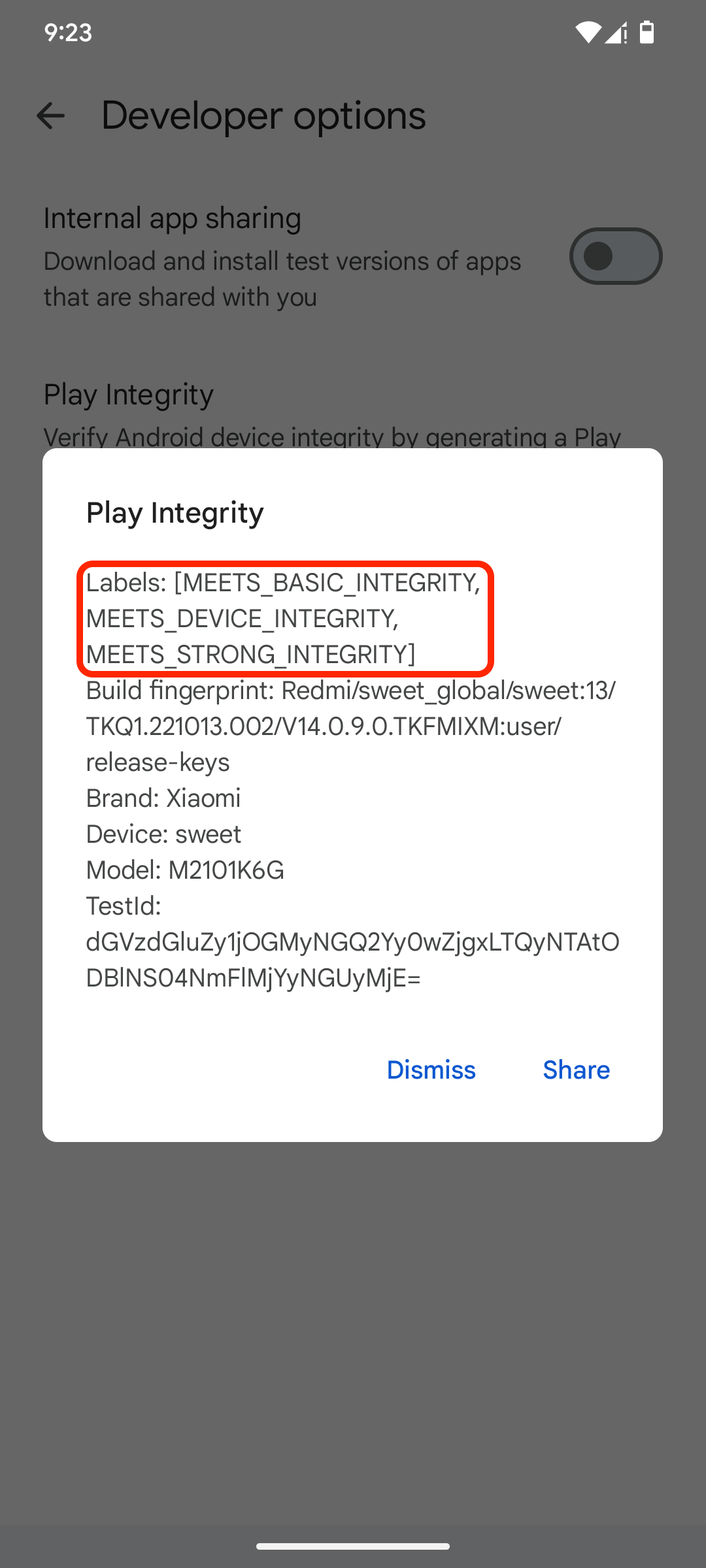
Hasilnya akan seperti ini:
:circle-check: MEETS\_BASIC\_INTEGRITY
:circle-check: MEETS\_DEVICE\_INTEGRITY
:circle-check: MEETS\_STRONG\_INTEGRITY
***
## Run Bank App on Android Root (KSU Next)
{% hint style="danger" %}
I am not responsible for anything happened to your device do at your own risk!
{% endhint %}
{% hint style="warning" %}
Gunakan kernel yang support KernelSU Next (KSUN)
{% endhint %}
| Test ROM | Android | Kernel |
| ----------------------- | ------- | -------------------------------------------------------------- |
| LineageOS 22.2 OFFICIAL | 15 | [~~LOSPerf + KSUNext + SUSFS~~](https://t.me/venturplayground) |
| PixelOS OFFICIAL | 15 | [~~Vantom KSU Next~~](https://t.me/venturplayground) |
Root:
* [KernelSU Next](https://github.com/KernelSU-Next/KernelSU-Next/releases/latest) (`KernelSU_Next_vx.x.x_xxxxx-release.apk`)
Required Modules:
* [ReZygisk](https://github.com/PerformanC/ReZygisk/releases/latest) (`ReZygisk-vx.x.x-rc.x-release.zip`)
* [Play Integrity Fork](https://github.com/osm0sis/PlayIntegrityFork/releases/latest) (`PlayIntegrityFork-vxx.zip`)
* [Tricky Store](https://github.com/5ec1cff/TrickyStore/releases/latest) (`Tricky-Store-vx.x.x-xxx-xxxxxxx-release.zip`)
* [Tricky Addon](https://github.com/KOWX712/Tricky-Addon-Update-Target-List/releases/latest) (`TrickyAddonModule-vx.x.zip`)
### Installation
{% hint style="info" %}
If you want (MEETS STRONG INTEGRITY) find a `keybox.xml` that has not been revoked. import `keybox.xml` in TrickyStore > Set Custom Keybox > find the `keybox.xml` that you got > save.
{% endhint %}
1. Install Module
* Install ReZygisk / Zygisk Next
* Install Play Integrity Fix / Play Integrity Fork
* Tricky Store
* Reboot
* Install Tricky Addon
* Reboot
2. Open KSU Next, Run Play Integrity Fix\
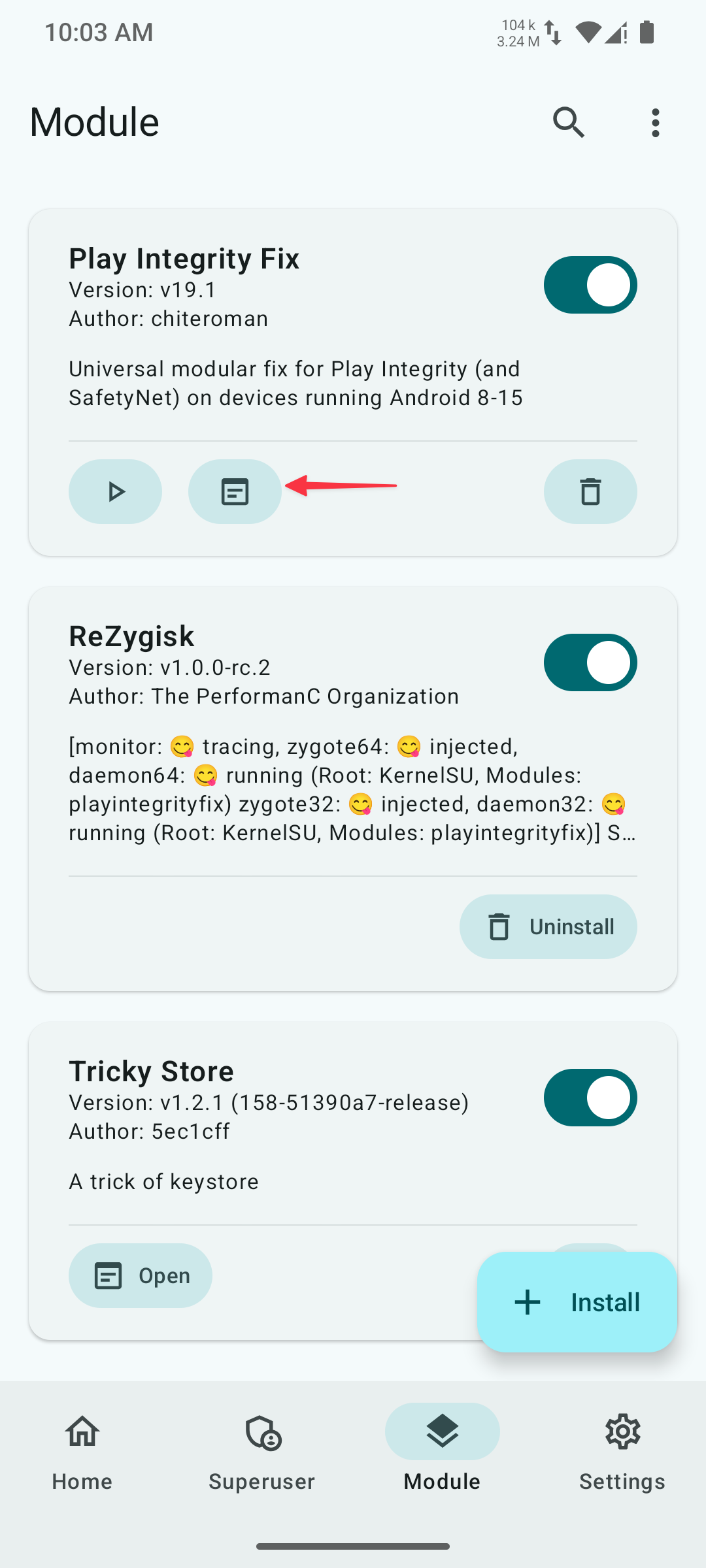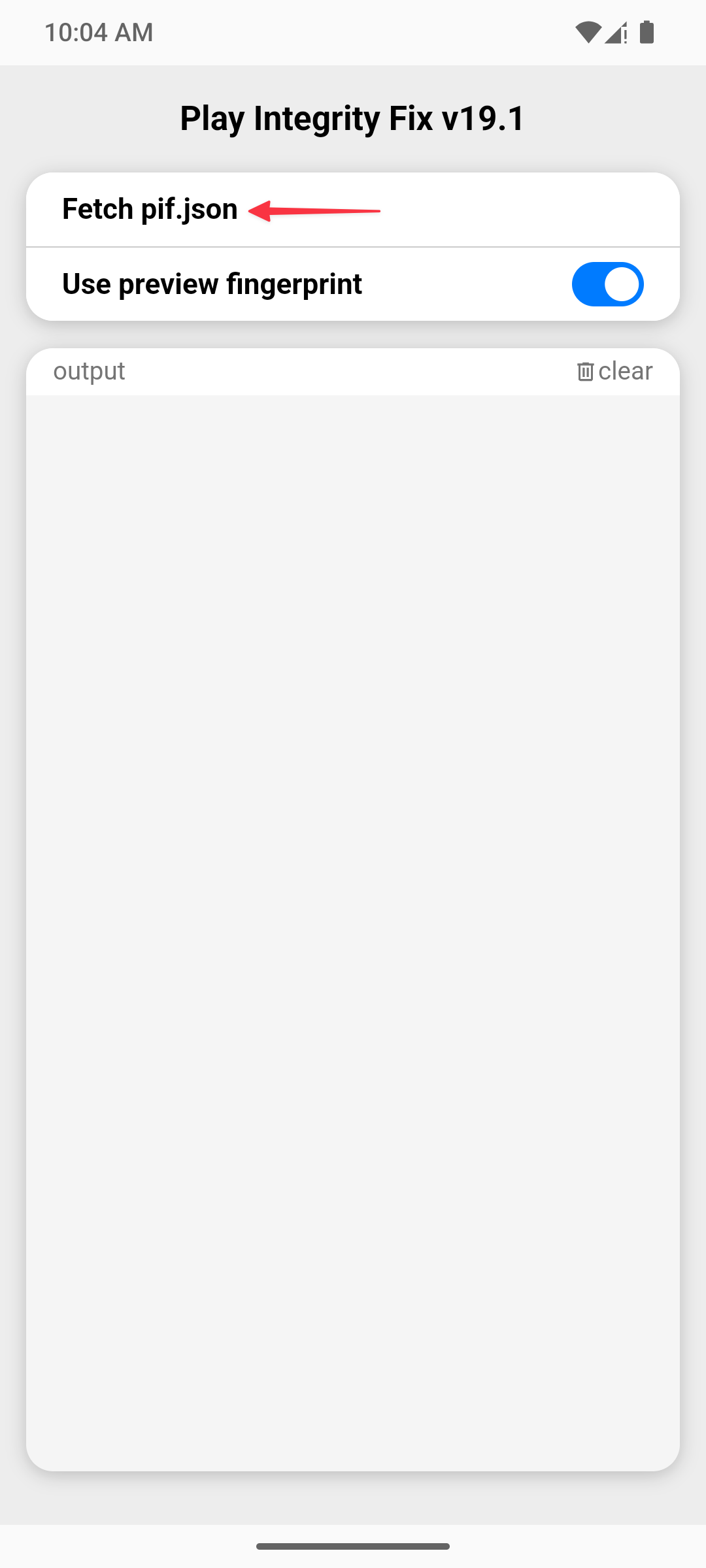
3. Run Tricky Store ➜ Click the hamburger menu (three lines)\

4. Clear Data PlayStore\

### Root Detection Apps (Optional)
* [Momo](https://faultxcloud.github.io/fx.rn10p.docs/assets/apk/Momo_4.4.1.apk) `.apk`
2e64a137c807a6ad6ecd1435a83dcca5
* [Android Key Attestation Test App](https://github.com/vvb2060/KeyAttestation/releases/latest) `.apk`
***
## Other Modules
{% embed url="" %}
{% embed url="" %}
{% embed url="" %}
***
{% embed url="" %}
---
# Agent Instructions
This documentation is published with GitBook. GitBook is the documentation platform designed so that both humans and AI agents can read, navigate, and reason over technical content effectively. Learn more at gitbook.com.
## Querying This Documentation
If you need additional information that is not directly available in this page, you can query the documentation dynamically by asking a question.
Perform an HTTP GET request on the current page URL with the `ask` query parameter:
```
GET https://faultx.gitbook.io/rn10p-docs/root/play-integrity-fix/archive.md?ask=
```
The question should be specific, self-contained, and written in natural language.
The response will contain a direct answer to the question and relevant excerpts and sources from the documentation.
Use this mechanism when the answer is not explicitly present in the current page, you need clarification or additional context, or you want to retrieve related documentation sections.