> For the complete documentation index, see [llms.txt](https://faultx.gitbook.io/rn10p-docs/llms.txt). Markdown versions of documentation pages are available by appending `.md` to page URLs; this page is available as [Markdown](https://faultx.gitbook.io/rn10p-docs/custom-rom/installation-guide/via-adb-sideload.md).
# via adb sideload
Metode ini juga bisa digunakan saat kamu mau install/flash ROM PixelOS atau yang lain, dengan memperhatikan 2 File: ROM `.zip` dan Recovery `.img`
Untuk ROM seperti PixelOS / *Pixel Goodies* tidak perlu install GApps, karen sudah termasuk / *include* di ROM-nya.
### Persiapan
{% hint style="danger" %}
### Caution
* **Backup** semua data penting, karena data akan terformat.
* **Sign out** Mi Account, Jika anda saat ini di MIUI ROM.
* **Sign out** semua akun Google untuk menghindari **FRP** *(Factory Reset Protection)*.
{% endhint %}
* Laptop/PC yang sudah terinstall [ADB & Fastboot Driver](/rn10p-docs/tools/adb-and-fastboot.md).
* Kabel data USB yang berkualitas (pakai bawaan lebih bagus).
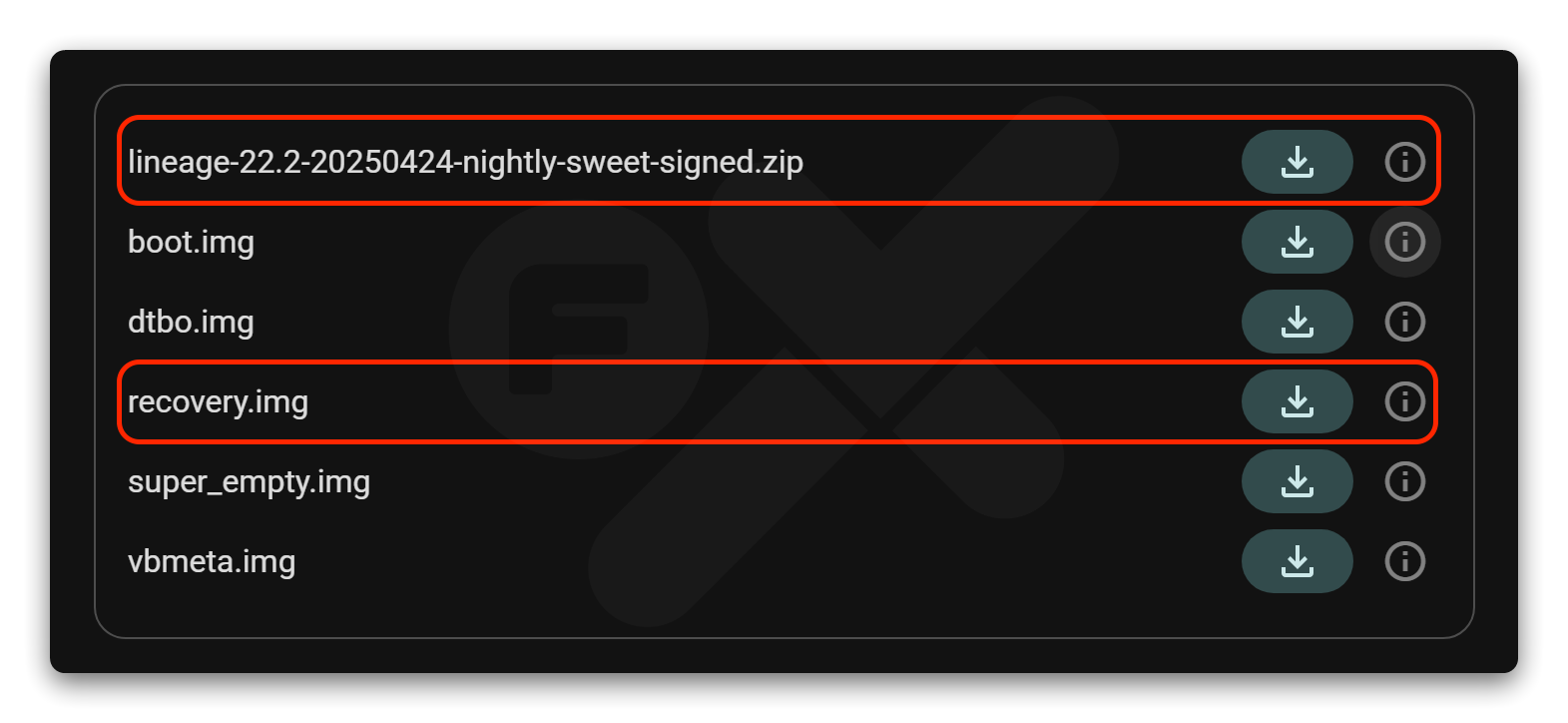
* File [LineageOS Official ](https://download.lineageos.org/devices/sweet/builds)untuk `sweet`.\
Download 2 File: **ROM `.zip`** dan **Recovery `.img`**
* File [Firmware](/rn10p-docs/firmware/firmware-only.md) .zip
* File [GApps](/rn10p-docs/gapps.md) (opsional, karena LineageOS murni tidak ada Play Store-nya).
* File [Magisk](https://github.com/topjohnwu/Magisk/releases) (Opsional)
{% hint style="info" %}
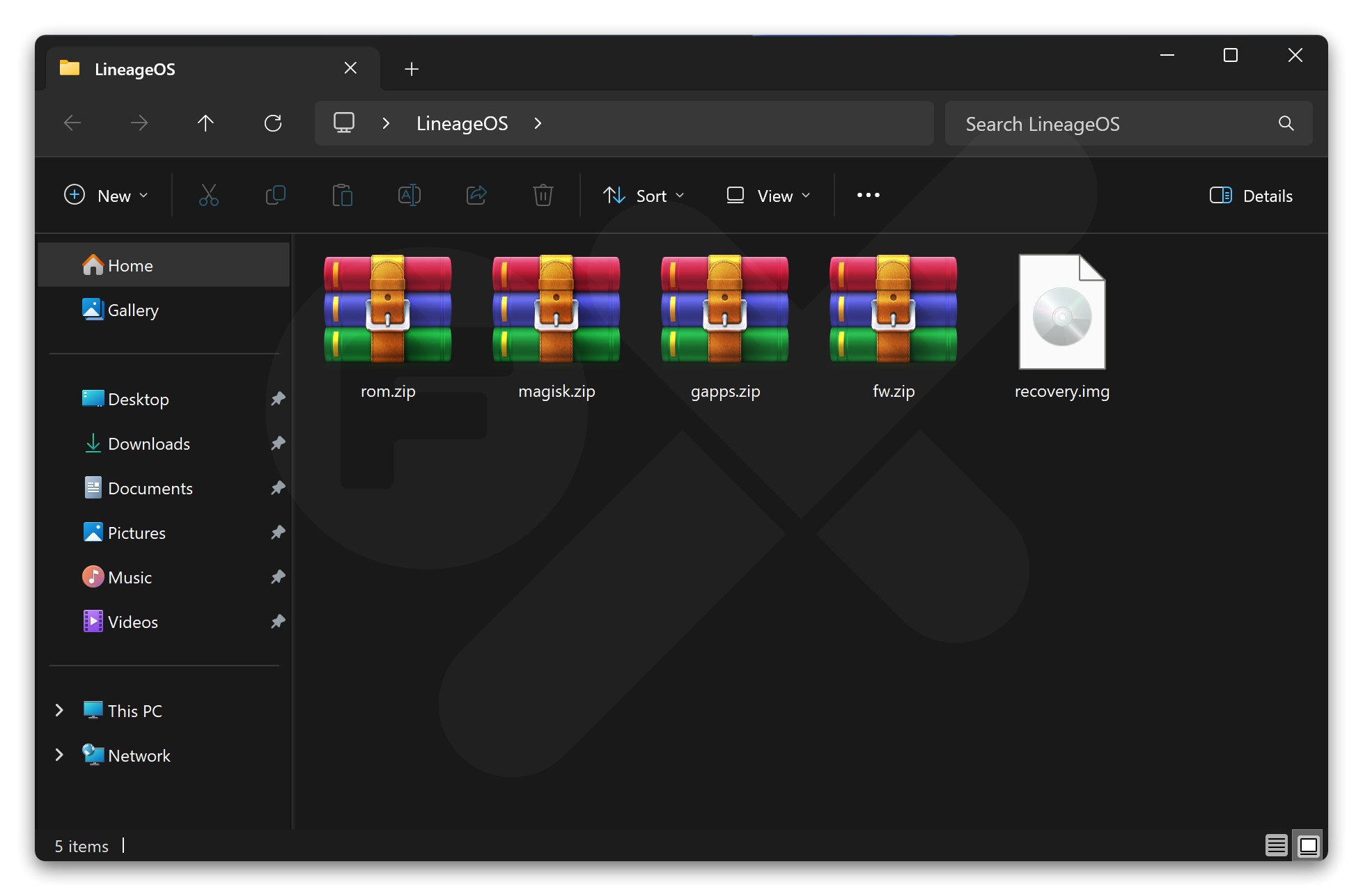
Rename semua file `.zip` yang dibutuhkan
* File ROM: lineage-xx.x-xxxx-nightly-sweet-signed.zip :arrow-right: **rom.zip**
* File Firmware: fw\_sweet\_miui\_xxxxx\_13.0.zip :arrow-right: **fw\.zip**
* GApps: MindTheGapps-15.0.0-arm64-xxxxx.zip :arrow-right: **gapps.zip**
* Magisk: Magisk.apk :arrow-right: **magisk.zip**
{% endhint %}
{% hint style="warning" %}
Kumpulkan semua file menjadi satu folder dengan nama misal "LineageOS" agar mudah saat proses flashing.
{% endhint %}
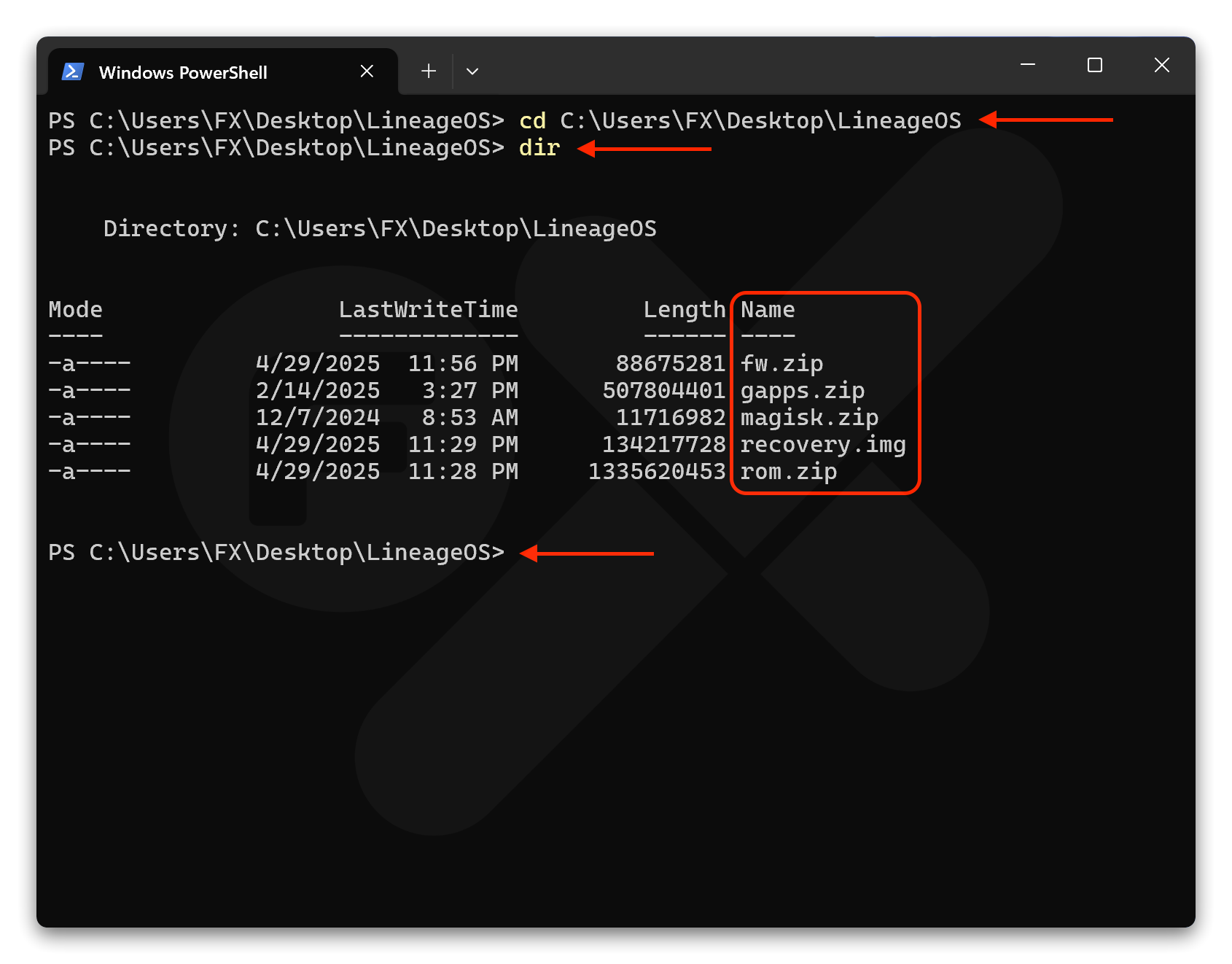
Buka CMD / Terminal arahkan folder yang tadi kita buat “LineageOS” ke Terminal/CMD
* Ketikan perintah: `cd` spasi lalu drag & drop / Tarik folder **LineageOS** ke Terminal/CMD lalu Enter
* Ketikan `dir` Enter
* Jika sudah seperti gambar (contoh) dibawah ini, maka lanjut ke step berikutnya.
***
## Langkah-Langkah Eksekusi
{% stepper %}
{% step %}
### Masuk ke Fastboot Mode
Matikan HP, lalu tekan **Power + Volume Bawah**.
Sampai ada keterangan **“FASTBOOT”**, lalu hubungkan device ke komputer dengan kabel USB.
{% endstep %}
{% step %}
### Verifikasi Fastboot Mode
Pastikan Device kamu sudah terhubung ke komputer dengan benar, dan masukan perintah:
{% code title="" %}
```
fastboot devices
```
{% endcode %}
Pastikan `Device ID` muncul
{% endstep %}
{% step %}
### Install Recovery
Masukkan perintah ini:
{% code title="" %}
```
fastboot flash recovery recovery.img
```
{% endcode %}
Tunggu sampai proses install recovery selesai dengan tulisan **“Done”** di terminal / CMD.
{% endstep %}
{% step %}
### Reboot ke Recovery
Reboot device ke Recovery Mode Tekan dan tahan tombol **Power + Volume Atas**.
Saat Logo “MI” muncul langsung lepaskan tombol **Power**.
{% endstep %}
{% step %}
### Format Data
Pilih :arrow-right: **Factory Reset** :arrow-right: **Format data / factory reset** :arrow-right: **Format data.** Ini akan menghapus enkripsi dan menghapus semua file yang tersimpan di penyimpanan internal, serta memformat partisi cache device kamu (jika kamu memilikinya).
{% endstep %}
{% step %}
### Reboot ke Recovery
Reboot device ke Recovery Mode Tekan dan tahan tombol **Power + Volume Atas**.
Saat Logo “MI” muncul langsung lepaskan tombol **Power**.
{% endstep %}
{% step %}
### Verifikasi adb sideload
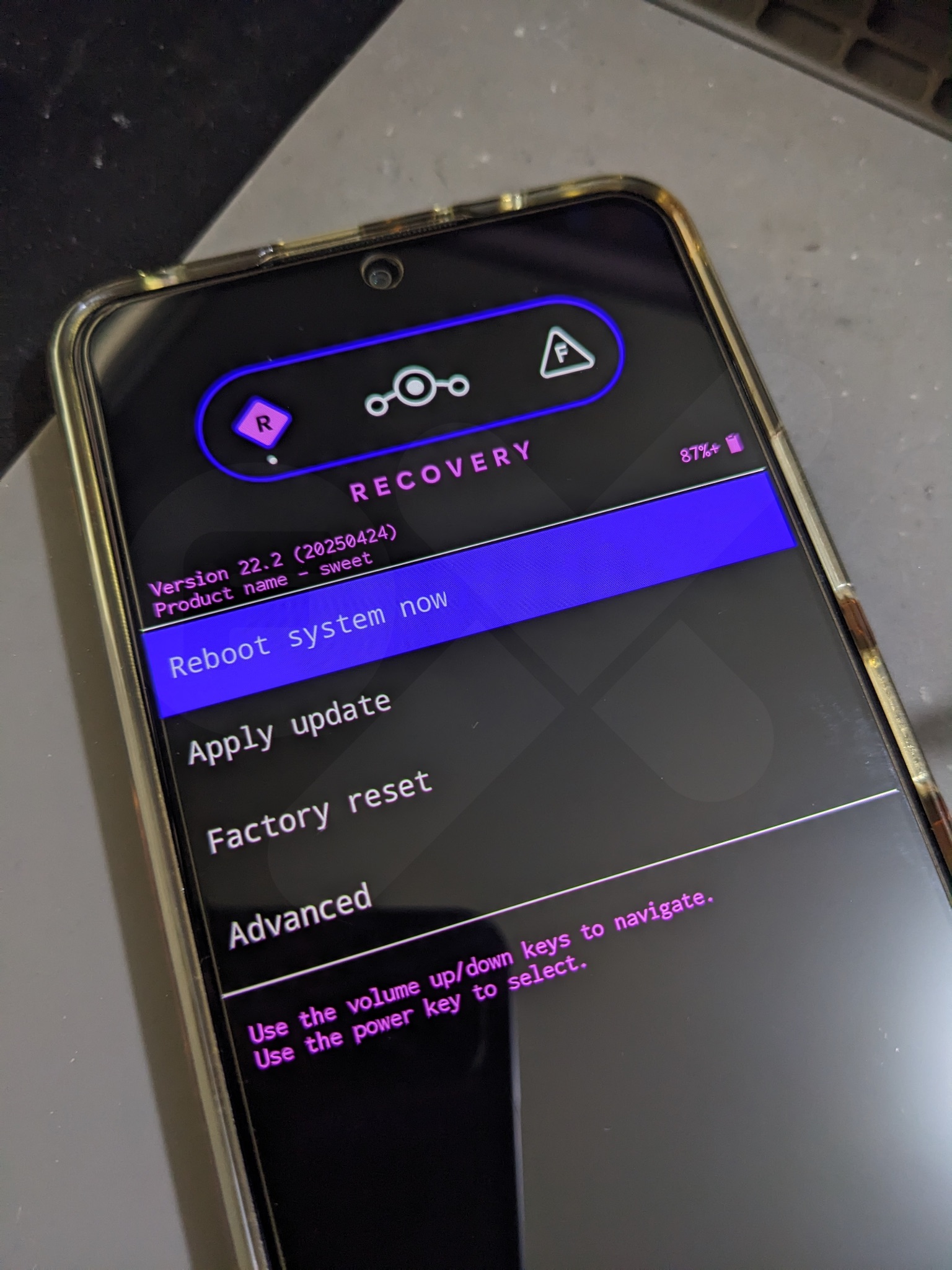
Jika sudah masuk ke Recovery
Pilih :arrow-right: **Apply update** :arrow-right: **Apply from ADB**
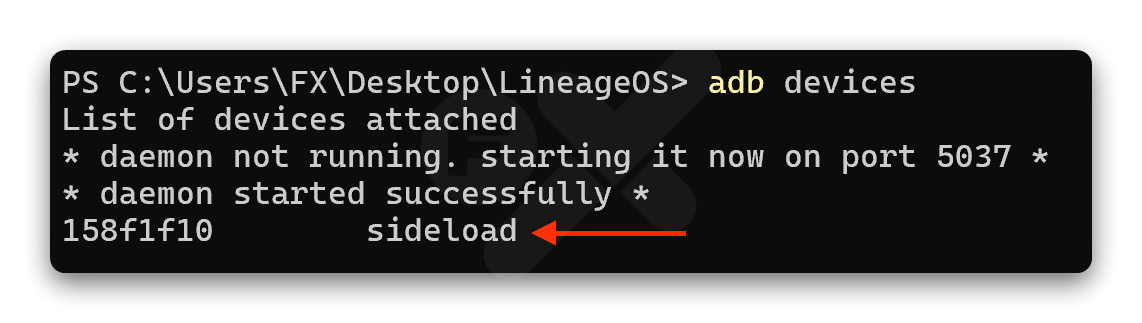
Cek untuk memastikan ADB Sideload terdeteksi di komputer, masukkan perintah:
{% code title="" %}
```
adb devices
```
{% endcode %}
Pastikan kembali jika berhasil terdeteksi akan seperti ini hasilnya:
{% code title="" %}
```
List of devices attached
fe4afbea sideload ← terdeteksi
```
{% endcode %}
{% endstep %}
{% step %}
### Flash Firmware
Masukkan perintah ini:
{% code title="" %}
```
adb -d sideload fw.zip
```
{% endcode %}
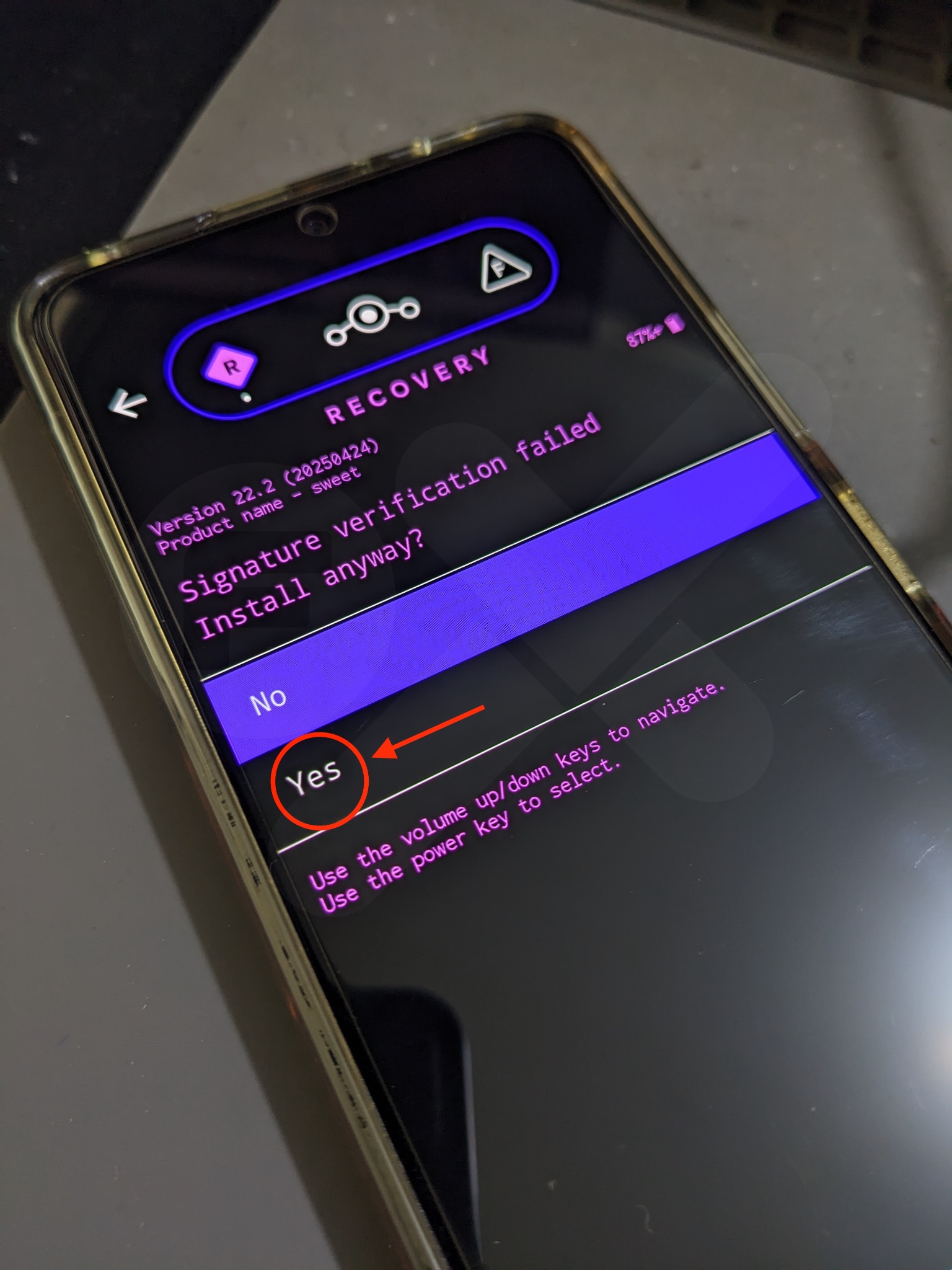
Tunggu proses install firmware berjalan, nanti akan muncul keterangan:
*Signature verification failed*\
*Install anyway?*
Pilih :arrow-right: **YES**
Proses akan dilanjutkan kembali, dan jika sudah selesai proses install firmware otomatis akan kembali ke menu utama recovery.
{% endstep %}
{% step %}
### Reboot ke Recovery
Pilih **Advanced** :arrow-right: **Reboot to recovery**
{% endstep %}
{% step %}
### Flash ROM
Jika sudah masuk ke Recovery
Pilih :arrow-right: **Apply update** :arrow-right: **Apply from ADB**
Masukkan perintah ini untuk flash ROM:
{% code title="" %}
```
adb -d sideload rom.zip
```
{% endcode %}
Tunggu proses instalasi & pastikan keterangan yang ada di device seperti:
`Install completed with status 0`
Proses install rom LineageOS sudah berhasil.
{% endstep %}
{% step %}
### Flash GApps
Pilih :arrow-right: **Apply update** :arrow-right: **Apply from ADB**
Masukkan perintah ini untuk flash ROM:
{% code title="" %}
```
adb -d sideload gapps.zip
```
{% endcode %}
Tunggu proses install GApps berjalan, nanti akan muncul keterangan:
*Signature verification failed*\
*Install anyway?*
Pilih :arrow-right: **YES**
Proses akan dilanjutkan kembali, dan jika sudah selesai proses install GApps otomatis akan kembali ke menu utama recovery.
{% endstep %}
{% step %}
### Install Magisk (Optional)
Caranya sama seperti flash GApps diatas
{% endstep %}
{% step %}
### Format Data
Pilih :arrow-right: **Factory Reset** :arrow-right: **Format data / factory reset** :arrow-right: **Format data.**
{% endstep %}
{% step %}
### Reboot
Pilih **Reboot system now** untuk booting ke LineageOS.
{% endstep %}
{% endstepper %}
***
---
# Agent Instructions
This documentation is published with GitBook. GitBook is the documentation platform designed so that both humans and AI agents can read, navigate, and reason over technical content effectively. Learn more at gitbook.com.
## Querying This Documentation
If you need additional information that is not directly available in this page, you can query the documentation dynamically by asking a question.
Perform an HTTP GET request on the current page URL with the `ask` query parameter:
```
GET https://faultx.gitbook.io/rn10p-docs/custom-rom/installation-guide/via-adb-sideload.md?ask=
```
The question should be specific, self-contained, and written in natural language.
The response will contain a direct answer to the question and relevant excerpts and sources from the documentation.
Use this mechanism when the answer is not explicitly present in the current page, you need clarification or additional context, or you want to retrieve related documentation sections.
 {% endhint %}
{% hint style="warning" %}
Kumpulkan semua file menjadi satu folder dengan nama misal "LineageOS" agar mudah saat proses flashing.
{% endhint %}
Buka CMD / Terminal arahkan folder yang tadi kita buat “LineageOS” ke Terminal/CMD
* Ketikan perintah: `cd` spasi lalu drag & drop / Tarik folder **LineageOS** ke Terminal/CMD lalu Enter
* Ketikan `dir` Enter
* Jika sudah seperti gambar (contoh) dibawah ini, maka lanjut ke step berikutnya.
{% endhint %}
{% hint style="warning" %}
Kumpulkan semua file menjadi satu folder dengan nama misal "LineageOS" agar mudah saat proses flashing.
{% endhint %}
Buka CMD / Terminal arahkan folder yang tadi kita buat “LineageOS” ke Terminal/CMD
* Ketikan perintah: `cd` spasi lalu drag & drop / Tarik folder **LineageOS** ke Terminal/CMD lalu Enter
* Ketikan `dir` Enter
* Jika sudah seperti gambar (contoh) dibawah ini, maka lanjut ke step berikutnya.